
CHATGPT BUSINESS HUB · LOCAL SEARCH
ChatGPT Business Hub: How to Claim Your Business and Prepare for Local Search Changes
How to find the right listing, distinguish a claim from the waitlist, prepare accurate information and measure what changes for your business.
I will expand this guide as new official information and verified observations become available. Last checked: November 14, 2026.
My Business Hub application: what happened on 14 November 2026
I wanted to document the process using my own business, rather than stop at an explanation of the interface. I opened the profile for Oleksandr Koliesnikov GEO & AI Visibility Consultant and continued through the verification steps.
One distinction became clear immediately: claiming a business and completing identity verification are not the same thing. The dashboard showed that the profile had been claimed, but verification was still required before I could use the next set of features.
My name, LIKEBOOSTER and the first document
The form asked for the legal business name and, separately, an additional trading name. In my case, I operate under my own name, Oleksandr Koliesnikov, and have the registered business name LIKEBOOSTER. These are different pieces of information, not interchangeable labels.
I first uploaded the Ontario registration document for LIKEBOOSTER. It did not pass the automated document check. The screen said that the required information could not all be found, but did not identify a specific cause.
That matters when interpreting the result. I cannot say that the rejection was caused by the trading name, the address or any particular field. The registration document contained an older address, but the error message did not establish that this was why the check failed.
The CRA document and the review status
I then submitted a CRA document relating to my business. After this submission, the screen showed “Application in review.”
A rejection email was also received. At the time of writing, I have not established which submission that email refers to. I am therefore not treating it as proof that the later CRA submission was rejected, or treating the review screen as proof of approval.
The confirmed sequence is narrower: the LIKEBOOSTER registration document failed the automated check; the CRA submission subsequently displayed a review status; a rejection email still needs to be matched to the correct attempt. Final approval has not been confirmed.
This experience does not establish that a CRA document is required or sufficient for every applicant. It describes what happened with my own submission.
The sections I could see
The interface showed three sections:
- Overview: the business profile and its current setup and verification status.
- Agent builder: the area for preparing and testing a business agent, where the business is eligible.
- Products: product information and catalogue/feed management, where supported.
Seeing these sections is not proof that every feature is available to my business. Verification, eligibility and separate publication steps still apply.
How I would handle this for a client
The client confirms their authority and completes their own Persona verification. Afterward, the administrator can invite the agency through the available account-access options. Claiming the business and completing Persona remain separate steps; agency access is not a substitute for identity verification.
What I will show next
First, I will reconcile the email with the submission history. When I receive a confirmed decision, I will update this account with the actual outcome. If approved, I will document the available settings, the information I add and the features I can genuinely use. I will then show the resulting profile and any measurable results that become available, rather than describe expected benefits as if they have already happened.
What launched, and why it matters
When someone chooses a contractor, shop or consultant, they need answers to practical questions: does the company serve their city, does its service fit the job, what affects the price, and what should they do next? If some of those questions are asked in ChatGPT, businesses need to understand which information informs the answer and how a person moves from comparison to an enquiry.
On November 10, 2026, OpenAI introduced Businesses in ChatGPT in beta. It includes Business Hub for managing company information and, for eligible businesses, Business Agents for conversations with prospective customers. OpenAI’s launch announcement.
In this article, I separate what OpenAI has documented, what businesses can do at their current access stage, and the marketing implications that remain scenarios. The information was checked on November 11. Early-access requirements can change.
Business Hub lets eligible companies claim a profile and contribute current information. Retailers can supply prices and availability through product feeds. A Business Agent answers questions using the business’s information, in a conversation clearly separated from ChatGPT’s independent answer. Product overview.
The current agent can explain products and policies, but cannot complete purchases, make bookings or check an order’s status. It can direct customers to the company’s website for those actions. Current capabilities and limitations.
For a marketer, the practical value is a closer connection between the company’s offer and the customer’s question. “Flooring” says little to someone who needs an existing floor restored rather than replaced. They need to know whether that work is offered, where, and what determines the estimate.
A clearer offer gives customers less to guess. That helps the website and customer service now, even if Business Hub still shows a waitlist.
However, managing a profile does not give a company control over recommendations. OpenAI can supplement information from other sources and does not guarantee placement, visibility, traffic or sales. Businesses in ChatGPT terms.
First, distinguish four stages
“We registered” can describe very different states during an early rollout:
- The company appears in a Business Hub search.
- The claim process is available, or a waitlist is shown.
- Authority to represent the business and the required identity checks have been approved.
- Available profile changes are published; an eligible agent is separately reviewed and published.
A search result confirms only that a listing was found. A waiting screen is not an approved claim. Describe the status literally: “listing found”, “waiting for an invitation”, “claim under review” or “verification approved”.
OpenAI’s release notes distinguish claim approval from Persona identity-verification approval. After Persona approval, businesses can publish information updates, connect a feed and view insights. Eligible businesses can then create an agent, but publishing it requires another action. November 10 release notes.
How to find your business and identify the next step
1. Start at the official entry point
Sign in to ChatGPT on the web and find Business Hub in the sidebar. Alternatively, open the Businesses in ChatGPT page and select Claim your business. The official button leads to Business Hub, with sign-in if needed.
Before starting, I recommend deciding who will manage the profile on the company’s behalf. Prepare access to the business email, website and current contact details. Avoid starting from an incidental employee’s account when the owner or a permanent administrator should manage it.
2. Search the exact name and check the match
Enter the company name and compare the result with the real business: its name, website, city and other displayed details. A matching name alone is insufficient. Similar names, old addresses and separate locations can cause confusion.
If the exact name produces no result, try a commonly used spelling. That is a search suggestion, not a promise that the interface supports every variation.
Record the date and result. “November 11: the matching profile was found, followed by a waitlist” is more useful to a team than “we are already in ChatGPT”.
3. If claiming is available
Select the correct listing and management account. Use a verification method offered for that business: phone, business email, domain or Shopify. Domain verification uses a DNS TXT record. Copy the values shown for your own application, then wait for OpenAI’s decision. OpenAI’s setup instructions.
I would first check who actually controls that channel. If an old contractor controls the email or domain, restore access before applying. Do not forward a personal claim invitation as a substitute for granting proper account access.
4. If you see the waitlist
The current early-access interface can show “You’re on the waitlist”, with an email notification when it becomes possible to continue the claim. This is an observed waiting state, not a completed setup.
Save the status, check the email address used in the process, and prepare the business information. When an invitation arrives, return through the official service.
I found no confirmed waiting time or universal way to accelerate an invitation in the material checked. Do not promise access tomorrow or say that joining a waitlist has already improved visibility. Waiting for access is also different from failed verification.
5. If the business is missing
An eligible online business may be offered an option to add a profile. For local stores and restaurants, the current help article limits claims to existing U.S. listings. If Contact support appears, use that route rather than creating a duplicate. Setup and eligibility guidance.
Do not change the country or category just to obtain access. A Canadian company needs to check its actual eligibility. ChatGPT being available in a country does not make every Businesses in ChatGPT feature available to every company there.
What to know before verification and publication
At launch, Business Agents are available to eligible ecommerce and online service businesses in the United States with a website. Industry and intended use also affect eligibility. Having a profile does not automatically give a business an agent. Availability and Business Agents Policy.
When Persona is used to create a new profile, OpenAI’s approval automatically publishes that profile. The agent is published separately. Prepare real business information before that step rather than assuming everything can remain a draft. Profile publication instructions.
Read the terms in advance. In particular, basic business information submitted for public display is subject to a perpetual, irrevocable display-use licence. The business remains responsible for current data and its published agent. Service terms.
What this could change for local traffic
The following scenarios are my assessment of possible customer behaviour. They are not measured launch results or a forecast of a specific percentage increase or decrease.
Some informational visits may stay inside ChatGPT
Imagine someone comparing engineered hardwood with solid wood. If a conversation provides enough explanation, they may not need to open several introductory articles on contractors’ websites.
The business could lose some informational page views. That does not automatically mean losing the same number of potential orders. Some previous visitors only wanted definitions and were not ready to buy.
For content, I would focus on reasons to choose the actual service: examples of work, the method’s limitations, the estimating process and a clear next step. Those may matter more than another generic article about a material’s benefits.
A visitor may arrive better prepared
Another customer may understand the options already and visit the website to check the company’s work and request an estimate. That visit could be closer to an enquiry than an initial educational click.
This remains a hypothesis to test. A visitor could also arrive with the wrong expectation, such as believing the company serves an area it does not cover. Measure the share of suitable enquiries alongside conversion rate.
Discovery and the final enquiry may use different channels
A person could discover a company in ChatGPT, search for it on Google, read reviews and then call. Website analytics may attribute the final visit to search even though discovery happened earlier.
Referrals from chatgpt.com therefore cannot describe the entire role of the channel. Ask a short question when an enquiry comes in: “Where did you first hear about us?” Store the answer separately from the technically detected referral source. They describe different parts of the journey.
Follow-up questions become part of the comparison
A conventional listing encourages comparison by name and rating. In a conversation, the customer can be more specific: “I need a floor refinished in an occupied apartment. What should I ask a contractor before an estimate?”
That is a reason to review the company’s own explanations. Do they cover room preparation, timing, extra work and circumstances that change the price? If each answer must be assembled manually from old messages, organize that information first.
These scenarios do not establish that Google Maps, local SEO or websites will become unimportant. My practical conclusion is to measure the whole customer journey and keep information consistent across channels.
An example: preparing a local contractor
Consider a hypothetical floor-installation and refinishing company. This is a teaching example, not a Business Hub implementation result or a claim that such a company can currently launch an agent.
“Best quality, every kind of job, affordable prices” does little to help a customer decide whether the contractor suits their project. I would collect:
- Types of work: distinguish installation, refinishing, spot repairs and product sales. Include only services the company actually offers.
- Service area: list real neighbourhoods and travel limitations.
- Estimating: explain the information needed, such as floor area, subfloor condition, material, removal and other relevant factors.
- Evidence of experience: select genuine projects with clear descriptions, not unrelated photographs.
- Terms: check the estimate process, response expectations, warranties and exclusions. Do not add promises the business cannot keep.
- Enquiry path: make it easy to send a request and understand what happens next.
This creates a useful foundation for the website, customer-service replies and available Business Hub fields. It does not mean that every item has a dedicated field in the current interface.
If an agent is available, test awkward questions too: “Do you work in my area?”, “Give me a final price without an inspection”, or “Can you promise the completion date before checking the property?” A good response can state an honest limitation and suggest the next step. OpenAI requires accurate information and prohibits invented offers, prices, reviews, guarantees and results. Agent rules.
How I would measure results when access becomes available
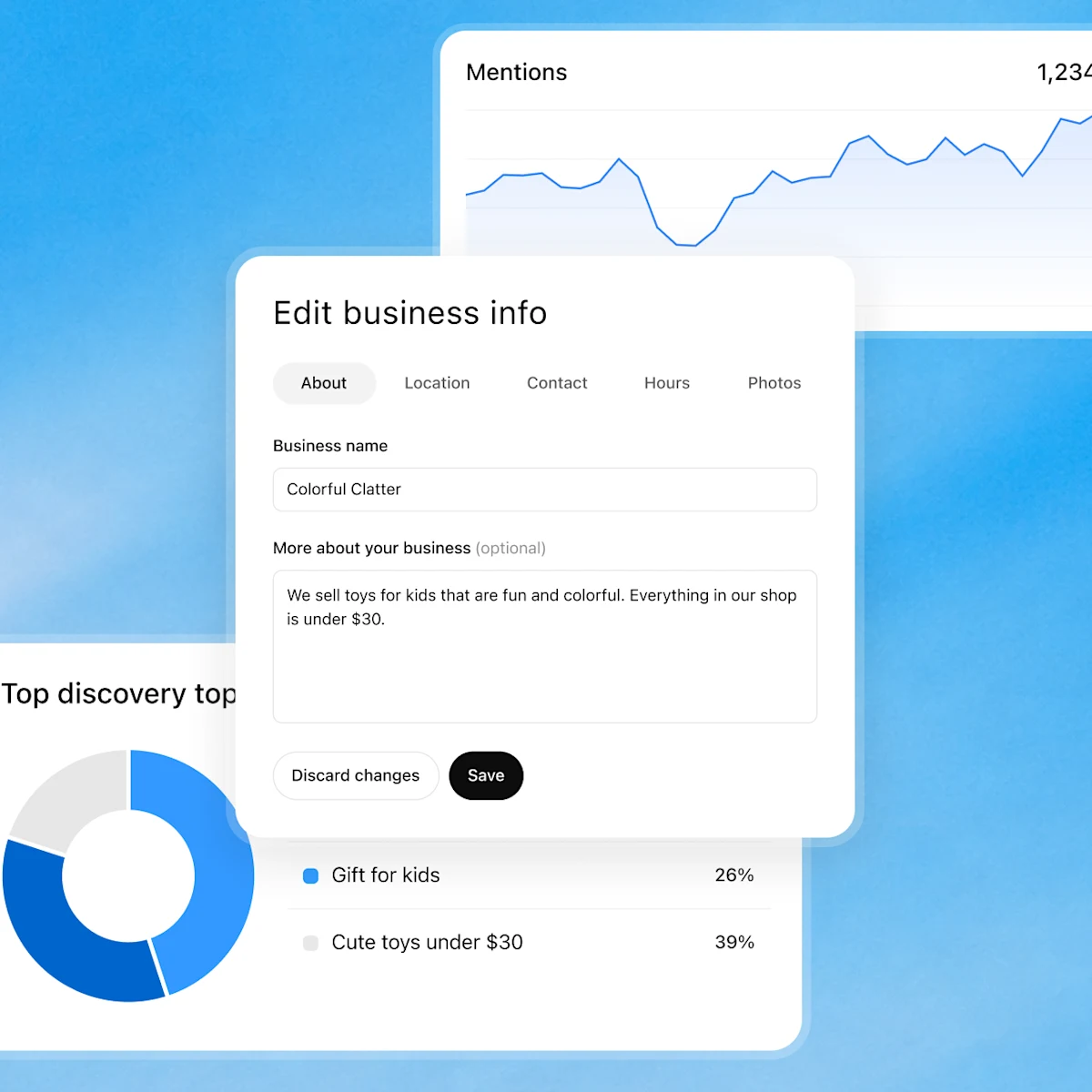
Business Hub provides aggregate insights, including mentions, website clicks and discovery topics. OpenAI does not give businesses users’ personal conversations or Business Agent chats. Reporting thresholds apply. Official announcement.
I would separate a business report into four levels:
- Representation: where the business appears, whether the description is accurate, and which errors recur.
- Visits: which website sessions can be linked to ChatGPT and which pages people reach.
- Enquiries: how many people call or submit a request, and how many fit the services and geography.
- Commercial results: how many suitable enquiries become estimates, orders and revenue.
Save a baseline before making changes. A small business could start with four weeks and compare equivalent periods, accounting for seasonality and working days. With few enquiries, conclusions must wait for more data. This is an observation plan, not a promise of results within a month.
Keep a dated log of profile, website, offer and advertising changes. If everything changed at once, an improvement cannot honestly be attributed to Business Hub alone.
It can also help to repeat a small set of customer questions under consistent conditions, recording the prompt, date, product and test settings. Those checks document observed answers, not the experience of all users.
Why fewer clicks do not always mean a worse result
Consider hypothetical arithmetic, not a forecast. In one period, a channel produces 200 visits and four suitable enquiries: 2%. In a later period, 120 visits produce six suitable enquiries: 5%.
Traffic falls 40%, while suitable enquiries rise 50%. This does not establish higher profit: orders, revenue and costs still need checking. But a traffic graph alone would tell the opposite story from the enquiry count.
The reverse can happen too: more visits, but irrelevant requests. I would not make mentions or clicks the sole project objective. My guide to tracking lead quality explains how I connect enquiries with later sales stages.
What is known, what to watch, and what remains uncertain
OpenAI has said it plans to expand Businesses in ChatGPT and Business Agents to more markets and business categories. That is a direction of development, not a confirmed access schedule for a particular company. Launch announcement.
My expectation is that businesses will need to maintain information that works well in a conversation: unambiguous service names, understandable conditions, and current prices and availability. The more an interface handles preliminary explanation, the more an error in its source information matters.
For now, I cannot reliably say:
- When a particular business will receive a waitlist invitation.
- When a specific country or category will gain agent access.
- What share of local enquiries the product will generate.
- Whether claiming a particular company will change recommendation frequency.
- Whether maintaining another profile will justify the time for a business with limited demand.
Answering the last questions requires observation, not just a product announcement.
What I recommend doing now
Use the official entry point, find the business and record its exact status. If claiming is available, follow the offered process carefully and understand the implications before verification. If a waitlist appears, prepare the information and wait for an invitation without inventing a deadline.
At the same time, correct website inaccuracies, describe real services and limitations, prepare customer questions and track enquiries. This work has value regardless of when the new dashboard becomes available.
Business Hub deserves attention as a new way for businesses to present information and talk with customers. Its practical value will depend on eligibility, information quality and audience behaviour. I would assess it through accurate representation, suitable enquiries and orders.
I will update this article as new official information and verified observations become available. Product facts and my interpretations will remain separate.